
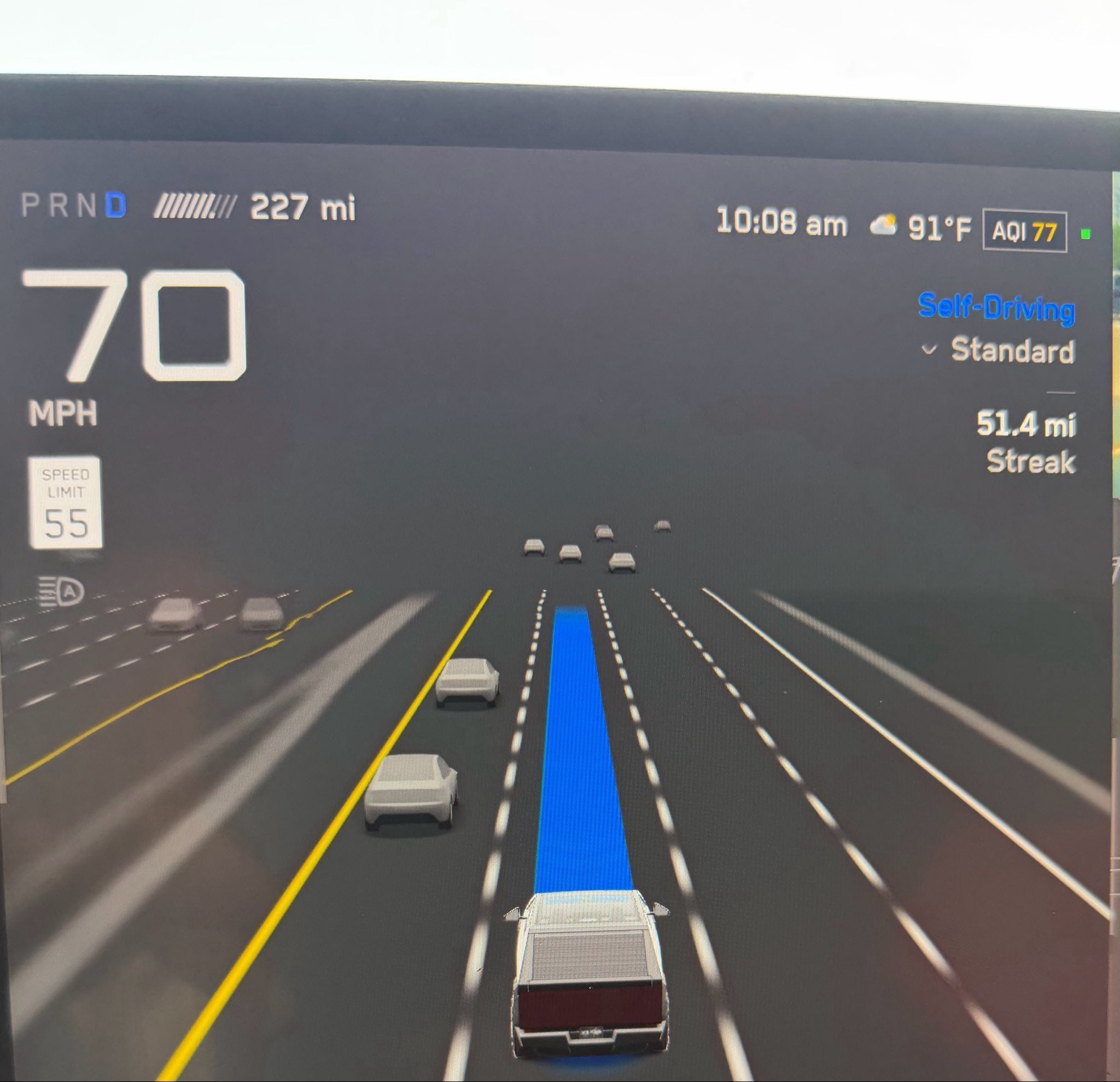
A recent Tesla owner post has renewed a familiar Full Self-Driving (Supervised) debate: why can the system appear competent in complex traffic yet still choose a speed that feels wrong for the road? The answer is not simply a missed sign. Tesla’s own documentation says FSD combines camera vision with map and navigation data, historical fleet information, surrounding traffic, posted limits and the driver’s selected Speed Profile. When those signals disagree, the car still has to choose one speed—and that arbitration remains visible to the person supervising it.
Map data can be useful and wrong at the same time
Map data gives FSD context before a sign enters camera range, especially near highway transitions and ramps. But maps can lag a changed limit, attach the wrong value to a parallel road or carry incomplete construction-zone information. Tesla’s Model 3 manual says the most recent map data improves accuracy. A recognized sign and a mapped limit may therefore present competing answers.
Speed-limit recognition is not just reading a clear sign
Camera recognition has its own edge cases: a sign may be blocked, weathered, temporary, angled toward another lane or conditional on school hours. The system must determine whether it applies to the current lane and when the new limit begins. FSD must infer that context from pixels, lane geometry, location and prior knowledge.
Traffic flow can conflict with the legal limit
Tesla says the Standard profile drives at a normal speed and adjusts to match traffic flow. That helps explain why FSD may not behave like a rigid cruise controller. On a fast-moving highway, strict adherence to a lower mapped value can feel unnaturally slow. Following surrounding cars too closely, however, could push the vehicle beyond the posted limit. Traffic speed is a useful contextual signal, not legal permission to speed, and the supervising driver remains responsible for intervening.
Driver preference adds another moving target
Tesla offers profiles ranging from Sloth and Chill to Standard, Hurry and Mad Max in supported U.S. vehicles. They influence speed and lane changes but do not create a simple “always drive five mph over” rule. Each profile still interacts with road geometry, traffic and the system’s interpretation of the limit. The same behavior can feel hesitant to one driver and too aggressive to another.
|
The practical rule: FSD is supervised driver assistance. Watch the displayed limit and vehicle speed, stay ready to brake or steer, and use only legal, safe inputs when correcting the system. |
Three EVBase upgrades for clearer cabin interaction
Model 3/Y 8.9-Inch Dashboard Instrument Display places vehicle information, including speed, directly ahead of the driver. EVBase lists left-hand-drive variants for Model 3 2017–2023 and Model Y 2020–February 2025. It displays synchronized data; it does not determine the legal limit or correct FSD decisions.
EVBase Tempered-Glass Screen Protector for Model 3/Y is listed for Model 3 2017–2023, Model Y 2020–February 2025, Model 3 Highland and newer Model Y variants. The matte option reduces reflections and fingerprints on the main display, which can make on-screen information easier to read in bright conditions. It does not alter FSD behavior.
Model 3/Y USB Hub Physical Quick Buttons fit Model 3 2017–October 2023 and Model Y 2020 and later according to the live page. The console-mounted controls provide shortcuts for selected cabin functions such as the glovebox, mirrors and lights. They are not speed or FSD controls, but they can reduce trips through touchscreen menus for supported functions.
|
Use code ev9999 to get 20% off any product at EVBASE. |
What Tesla still needs to solve
The long-term challenge is confidence: drivers need the system to explain, through consistent behavior, which speed source it trusts and why. Better maps alone will not solve obscured signs; better sign recognition alone will not solve temporary limits or traffic-flow conflicts. Tesla’s task is to fuse every input while remaining predictable, legally appropriate and easy to supervise. Until then, speed selection will remain one of the clearest reminders that FSD is supervised—not autonomous.
Related EVBase links
· Browse Tesla multifunction displays
· Browse EVBase shortcut buttons
· Browse Model 3 interior accessories
Sources
· James McPherson owner post on X
· Tesla Support — Full Self-Driving (Supervised)
· Tesla Model 3 Owner’s Manual — Full Self-Driving (Supervised)
Share:
NHTSA Denies Tesla Headlight Petition Covering 19,917 Cars
Tesla Opens Six-Stall 1.2MW Megacharger in Bloomington, California for Tesla Semi